Insert & Find

Now you already know how to add tables. Next, we'll have a look on how to actually add data into the tables and find the specific data.
Getting Started

Before starting this chapter, please:
- create a new database called testdb (drop the existing one if it already exists) and use it
- add one table in the database called persons that contains these fields: name VARCHAR(100), age SMALLINT, createdAt TIMESTAMP
Answer
DROP DATABASE testdb;

CREATE DATABASE testdb;

USE testdb;

CREATE TABLE persons(
    name VARCHAR(100),
    age SMALLINT,
    createdAt TIMESTAMP
);
Inserting Data

Like with other SQL operations, inserting data is super simple. The basic syntax looks like this:
INSERT INTO tableName (field1, field2, field3) VALUES (field1Value, field2Value, field3Value);
Inserting One Person
Now, to add one new person to the persons table, we can do:
Which adds person called Tony with age set to 19 and createdAt field set with special NOW() function to exact current time.
Info
Notice that when adding text data, we need to encapsulate it with double or single quotes.
Inserting Multiple Persons
We can also add multiple persons at the same time by adding multiple values like this:
Selecting (Finding) Data

Now, in order to actually verify that the data was inserted, let's learn about the SELECT statement which can be used to find data. The basic syntax for that command is this:
SELECT fields FROM tableName;
This statement can have multiple variations and you can pass other identifiers for it, but for now let's just learn few basic ways to find data.
Getting All Data From a Table
To get all data from a table persons, we can do this:
Which should output:
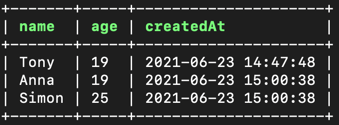
This selects all the fields from the table persons. The asterisk denotes everything.
Getting Certain Fields from a Table
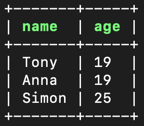
To get only the name and age from the table persons, you can do this:
Which should output:
Getting Only Certain User(s)
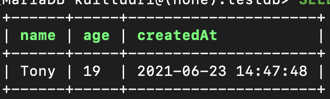
You can also add identifier WHERE at the end of the SELECT statement to find record(s) with given data:
Which outputs:
Info
Notice that we only use single = for comparisons, not two (==) like usually in programming languages.
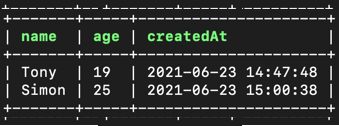
And you can also use AND or OR identifiers to have even more flexibility when finding:
Which outputs:
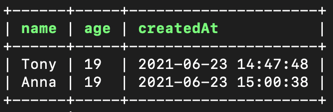
It is also possible to find numeric values with less than or larger than statements, like this:
Which outputs:
Removing the Database

Now that this database is no longer required, feel free to remove it:
Conclusion

In this chapter we learned to:
- Insert data into tables
- Find data
- That you can chain targets after the WHERE clause by using AND or OR.
Learn More
