Update & Removal

Now you know how to update and remove data. It's now time to learn how to update or remove data!
Getting Started

Before starting this chapter, please:
- create a new database called updateremovedb (drop the existing one if it already exists) and use it
- add one table in the database called computers that contains these fields: id INT, manufacturer VARCHAR(100), model VARCHAR(100), forHomeUse BOOLEAN
Answer
DROP DATABASE updateremovedb;

CREATE DATABASE updateremovedb;

USE updateremovedb;

CREATE TABLE computers (
    id INT,
    manufacturer VARCHAR(100),
    model VARCHAR(100),
    forHomeUse BOOLEAN
);
And before we start, let's add couple computers into that table:
INSERT INTO computers (id, manufacturer, model, forHomeUse) VALUES
    (1, "Appel", "Pro", TRUE),
    (2, "Homebook", "Basic", TRUE),
    (3, "Taser", "Legion", FALSE),
    (4, "Hell", "latitude", TRUE);
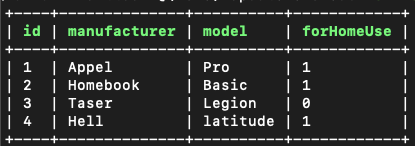
And when doing SELECT * FROM computers, we will get this output:
Updating Data

When you want to update data, you need to use the WHERE clause to find what data you want to update. The basic syntax for updating record(s) is this:
UPDATE tablename SET column1 = value1, column2 = value WHERE conditions
Changing Manufacturer
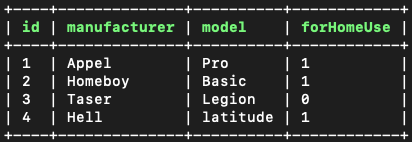
For example, now we figured out that we made a mistake when inserting Homebook Basic into our table. It should actually be Homeboy Basic!
So, to change that, we can do this:
Notice also the LIMIT 1 in the ending of the statement. With this we can limit that no matter what, only one record gets updated.
And when we now do SELECT * FROM computers, we will get:
Great!
Removing Model
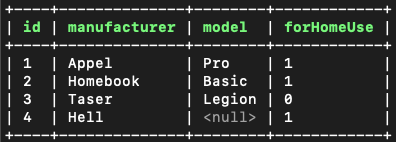
Another way to use the update statement is to remove or modify another field in the found record. For example, say we know the manufacturer of the computer Hell and we would like to set the model as null. For this, we can do this kind of statement:
And now when we do SELECT * FROM computers, we will get:
Changing all 'for home' computers to 'not for home'
In the example above we only updated one record. But what if we would want to update multiple records at the same time?
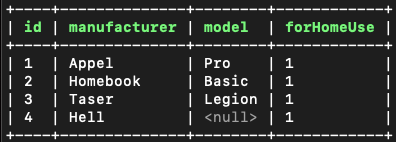
By default, the UPDATE statement updates all found records. So, for example, to change all forHomeUse fields that are FALSE to be TRUE, we can do this:
And when running SELECT * FROM computers, we will get:
Nice!
Deleting Data

As with the UPDATE statement, you can delete record(s) with the DELETE statement and you need to use the WHERE clause to specify which record(s) you want to remove. The basic syntax for removing record(s) is:
DELETE FROM tablename WHERE conditions
Removing one computer
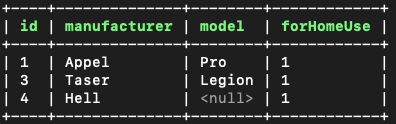
OK, so to see an example of this statement, let's remove a computer with an id of 2:
Notice again that LIMIT 1 was used to limit the statement to only 1.
Now, when we do SELECT * FROM computers, we will get:
Removing Multiple Computers
By default, the DELETE statement removes all records that it finds.
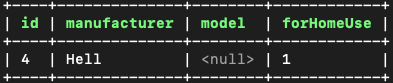
So, to for example remove all computers that have the model set, we could do this:
And when we now do SELECT * FROM computers, we will get:
Removing the Database

Now that this database is no longer required, feel free to remove it:
Conclusion

- UPDATE statement can be used to update one or multiple records. By default it targets multiple.
- DELETE statement can be used to remove one or multiple records. By default it targets multiple.
- Both of these statements can be modified to only target 1 record by adding LIMIT 1 to them.
Learn More
