Null & Not Null

In SQL, null means that something is empty or it does not exist at all. This can be used to set if some field can be set to empty or not or to find records that have or do not have empty fields.
Getting Started

Before we start this chapter, let's create a new database and a new simple table that holds basic information about a person. So, create a new database called dbnull, use it and create a new table in there called persons that can hold this kind of information: userId, name, age, hasLoggedIn, nickname.
Answer
CREATE DATABASE dbnull;

USE dbnull;

CREATE TABLE persons(
    userId INT,
    name VARCHAR(150),
    age TINYINT,
    hasLoggedIn BOOLEAN,
    nickname VARCHAR(100)
);
Null

You've probably already encountered the concept of null in programming languages. Null, in SQL context, means that the data is not set or known.
When you run DESCRIBE persons, you would see this:
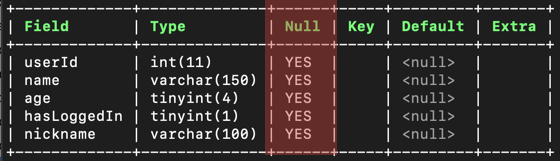
And you can see this column called Null in there that mentions YES for each field. What this actually means is that currently the data for each of these fields can be null (empty). When you create fields and you do not specify if the field could be null (empty), it is set to be able to be null by default.
Testing the Behavior
So, all the fields can currently be empty. To try out this behavior, try this insert command:
And when we run SELECT * FROM persons, the output is:

And o - ou, this is not good! We definitely do not want data like this into our database, even by with mistake.
Danger
NULL is the default behavior with most RDBMS systems. Check below how this can be set to NOT NULL for the fields which we never want to be empty.
Not Null

So, in order to actually fix this problem, we can use a magic word called NOT NULL to define that the field(s) should not be null. We could alter the table and individually now fix the columns to be of right sort, but let's actually remove the table and recreate it with NOT NULL set to most of the fields.
So first, let's remove the old table:
Now, let's recreate the table again. Before we create the table again, we need to think what fields we want to be able to be null and what not. In this table, each user should have userId, name, age and information if user has logged in BUT not everyone might have a nickname. So we can leave the field nickname as null.
Now, to use these new words that we learned, we can recreate the table like this:
CREATE TABLE persons (
    userId INT NOT NULL,
    name VARCHAR(150) NOT NULL,
    age TINYINT NOT NULL,
    hasLoggedIn BOOLEAN NOT NULL,
    nickname VARCHAR(100) NULL
);
Now, run the command DESCRIBE persons again and you will see this output:
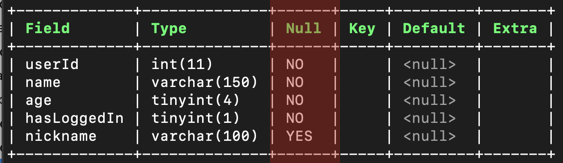
Nice!
Testing the Difference
Now, in order to try out the difference, try adding empty record into the table again by running this command:
Which should return into an error like this: (1364, "Field 'userId' doesn't have a default value"). Great! This means that we no longer can feed null (empty) data into our fields.
To try out this new behavior, let's insert one user into our table without the nickname set:
And then when we run the command SELECT * FROM persons, we should see this kind of output:

Great! That worked. Now – we could set the nickname to something if we wanted to, or we could leave it as empty like we did here.
Is Null & Is Not Null

We can also use the IS NULL and IS NOT NULL comparison operators in conjunction with the WHERE statement to find fields that are or are not empty.
To test out this behavior, let's add some new users into the persons table:
INSERT INTO persons (userId, name, age, hasLoggedIn, nickname) VALUES
    (2, "Timo", 19, TRUE, NULL),
    (3, "Jenny", 19, FALSE, "Jennie"),
    (4, "Anna", 57, FALSE, "Annie");
Now, for example to find all the users who have the nickname set, we could do this:
Which outputs:
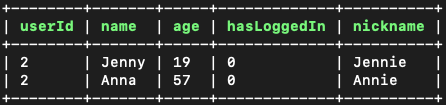
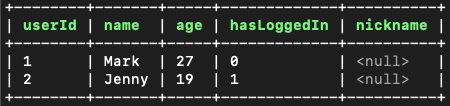
And on the other hand, to get all users who have the nickname set, we could do this:
Which outputs:
Removing the Database

If you no longer want to play around with this this database, as a last thing, remove the database that you created:
Conclusion

In this chapter we learned what are null & not null values and how to set fields to be able to be null or not null.
Learn More
