Default Values

Another commonly used word when creating tables is DEFAULT. This can be used to set default value for a field if it is not set.
Getting Started

Before we begin, let's create a new database and use it:
And let's also create one table that holds basic information about cats (notice how we will now begin to use the NOT NULL):
CREATE TABLE cats(
    name VARCHAR(100) NOT NULL,
    age TINYINT NOT NULL,
    location VARCHAR(100) NOT NULL,
    owner VARCHAR(100) NULL,
    createdAt TIMESTAMP NOT NULL
);
And then when we verify that the table was created and run DESCRIBE cats to do that, we will get this output:

With this output, notice the Default column. This means what the default value for that field would be, if it would not be set.
Setting Default Values

Now, setting default values is simple and very similar to setting the NOT NULL or NULL for a field. We will next set default values for the cats table, but first let's remove the current table to be able to recreate it with default values:
And then we need to think what default values we could add for the fields. So, for the location let's set Finland as the default value. For the createdAt (with data type TIMESTAMP) we would also want the time to be exactly current time by default. So, here's how we do these new changes:
CREATE TABLE cats(
    name VARCHAR(100) NOT NULL,
    age TINYINT NOT NULL,
    location VARCHAR(100) NOT NULL DEFAULT "Finland",
    owner VARCHAR(100) NULL,
    createdAt TIMESTAMP NOT NULL DEFAULT NOW()
);
So the syntax for setting the default value is DEFAULT value. For the location we set Finland as the default location and for the createdAt we set NOW() as the default value. This NOW() function is a special function in MySQL that returns the current time.
Testing the Changes
Now, try adding this kind of data into the table cats:
And when we do SELECT * FROM cats we can see this output:

And that's it! We can now see that the location was automatically set to Finland and createdAt to current time.
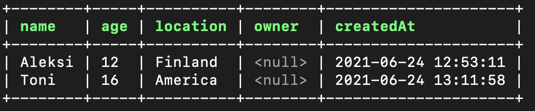
We could also override the location (and even createdAt); Like this:
This would result to this kind of output when doing SELECT * FROM cats:
Removing the Database

As the last thing, remove the database that you created:
Conclusion

- In this chapter, we learned that default values could be set to fields when creating the table using DEFAULT.
Learn More
