Primary Key
 There is one super important basic thing we need to still cover, which is one of the main aspects of relational databases. This is the concept of primary keys.
Info
Heads up! This is an important topic with relational databases. Better now read and understand this topic.
Getting Started

Before we dive into this subject, create a database called primarytest if it does not exist yet and use it:
And then let's create a table called Persons again that can store information of different persons:
And let's add couple persons into it:
INSERT INTO persons (personId, name, age) VALUES
    (1, "Marty mcTester", 95),
    (2, "Tina Tester", NULL),
    (1, "Marty mcTester", 26);
Info
Notice that we have two persons named Marty mcTester, but they are different users with different age.
Duplicate Values

Now, let's describe the table and see what we'll get:
which outputs:
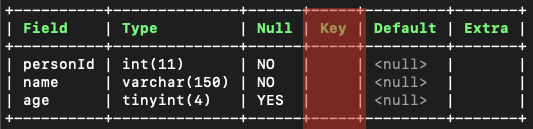
And from that output we can see that there is still the Key field which we have not yet covered.
Also, for this table we added duplicate data. When finding all the persons in the table with SELECT * FROM persons, we'll get this output:
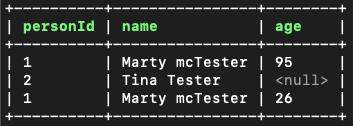
Notice that Marty mcTester with the personId 1 is twice in the records with duplicate values. We never want this kind of duplication to happen! So - how could we prevent this from happening?
Primary Keys to the Rescue!

We can add the definition of a PRIMARY KEY for one of the fields in our table to make it unique and also to determine that this field will uniquely determine the record in the table. In this case, we want the personId to be the primary key.
To try this out now, let's drop our table first:
And let's recreate the table persons with primary key set to the personId:
CREATE TABLE persons(
    personId INT NOT NULL,
    name VARCHAR(150) NOT NULL,
    age TINYINT NULL,
    PRIMARY KEY (personId)
);
... And let's try adding the same data again into the table:
INSERT INTO persons (personId, name, age) VALUES
    (1, "Marty mcTester", 95),
    (2, "Tina Tester", NULL),
    (1, "Marty mcTester", 26);
Warning
Which gives us an error about a duplicate entry. Great!
We need to now fix the insert statement by removing the duplicate id from there (changing last 1 to 3) by making the statement look like this:
INSERT INTO persons (personId, name, age) VALUES
    (1, "Marty mcTester", 95),
    (2, "Tina Tester", NULL),
    (3, "Marty mcTester", 26);
And then when we run SELECT * FROM persons, we'll get this kind of an output:
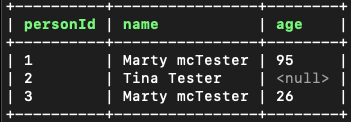
And from this output we can see that Marty mcTester is there twice, but with different personId that can be used to identify two different Martys.
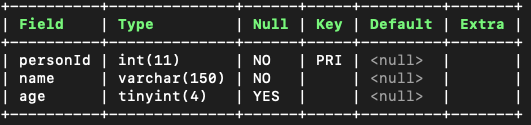
Also, when running the DESCRIBE persons command, we can also see that the field personId is now the primary key for this table:
Auto Increment

When data in your table grows longer, it gets harder to actually assign an unique ID for a record. To make our life easier, there is a cool definition called AUTO_INCREMENT that will automatically assign a record the next numerical ID.
In order to try this out, let's use the ALTER TABLE command we've learned in the past to change our personId to being an automatically incrementing number:
And let's now try adding some new data to try it out:
And then when we run SELECT * FROM persons, we'll get:
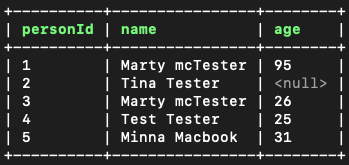
And we can see that the personId is now automatically incrementing. Fantastic!
And by the way, auto increment can be used in this kind of a fashion when you would create a new table:
CREATE TABLE persons(
    personId INT NOT NULL AUTO_INCREMENT,
    name VARCHAR(150) NOT NULL,
    age TINYINT NULL,
    PRIMARY KEY (personId)
);
Starting Number for Auto Increment
Starting number of auto increment can also be set. So instead of starting from 1, you could for example start from 100 by running this kind of an command:
Now, if we would add couple new persons to the table:
And when we would run SELECT * FROM persons, we would get this:
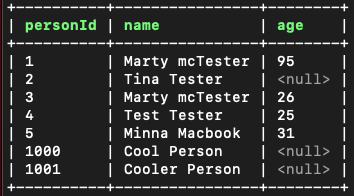
From which you can see that the next user has the ID of 1000 and the one after that 1001.
Removing the Database

As a last thing, remove the database that you created:
Conclusion

In this chapter we learned that:
- Primary Key can be added for one field in a table. It automatically makes the field unique. This primary key is used to distinct records from each other.
- Auto Increment can be used to automatically increase a field, like an ID field. Note that auto increment can only be added to a field that has been set to being a primary key.
Learn More
