Designing CMS

Before we are finished with the design of databases part, let's do another example so this concept of design will become more familiar.
In this chapter, we will design a very simple CMS (Content-Management System) relational database. This CMS system could be used to manage a website content. Think Wordpress, blogging system or some website builder but super lightweight version.
Requirements

Before we move on to designing the database, let's first define what users should be able to do with our Content Management System (CMS):
Visitors should be able to:
- navigate the pages (navigation on top)
- see the footer (items on bottom of the page)
- login
Logged-in users should be able to:
- Add, edit, remove pages
- Page should have a title, url ending, content, authors (users who wrote it)
- Author information should be visible if user wants to
- Change whole site title and url
Reference Image of the Site

it is a great thing to search for a reference image of what you would be creating to better identify the entities that belong to it and relationships between the entities.
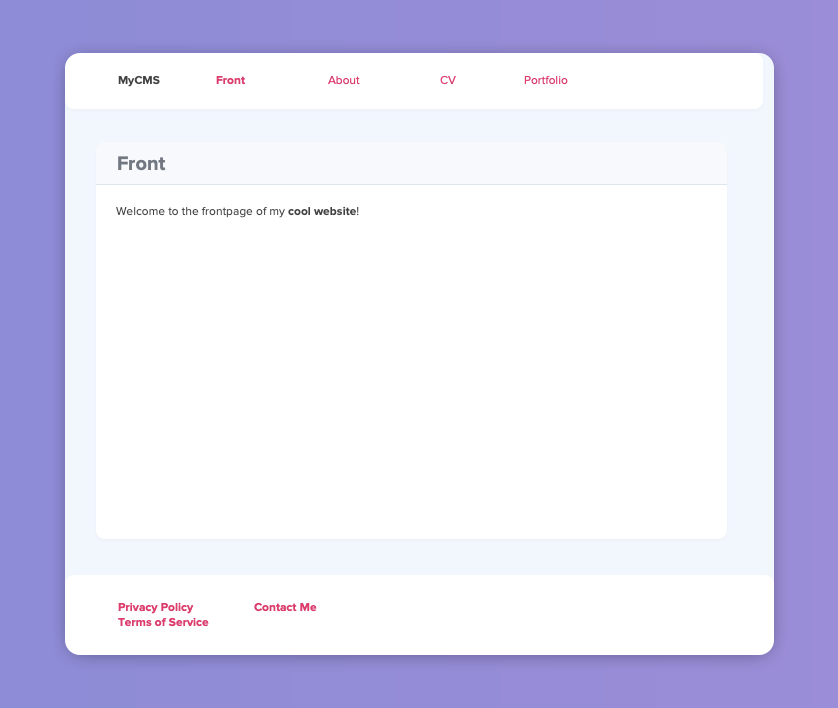
Related to this project, I have created this reference image that can be used to identify parts of the website:
Entities

So, first, before you read further, think what kind of entities you would need for this kind of website.
Let me start listing all the entities and values I could think of and then let's start grouping that list:
- logged-in user
- visitor
- navigation section
- page
- site title
- site url
So, the logged-in user and visitor could be combined into one: users. Navigation section could be just one table called navigation, where we could define if the navigation item should be located in the header or footer. Page could be an table called pages and site title and url and other information like this could be combined into one table called settings.
So our final tables would be:
- users
- navigation
- pages
- settings
Great! Let's then start defining the tables.
Table users

As users would need to be able to login, we need them to have an username and password. It would also be good for them to have an email set for password resets to be implemented later on. For their author information to be shown on pages, we can set their name in this table, too.
So, minimal users table with couple example users could look like this:
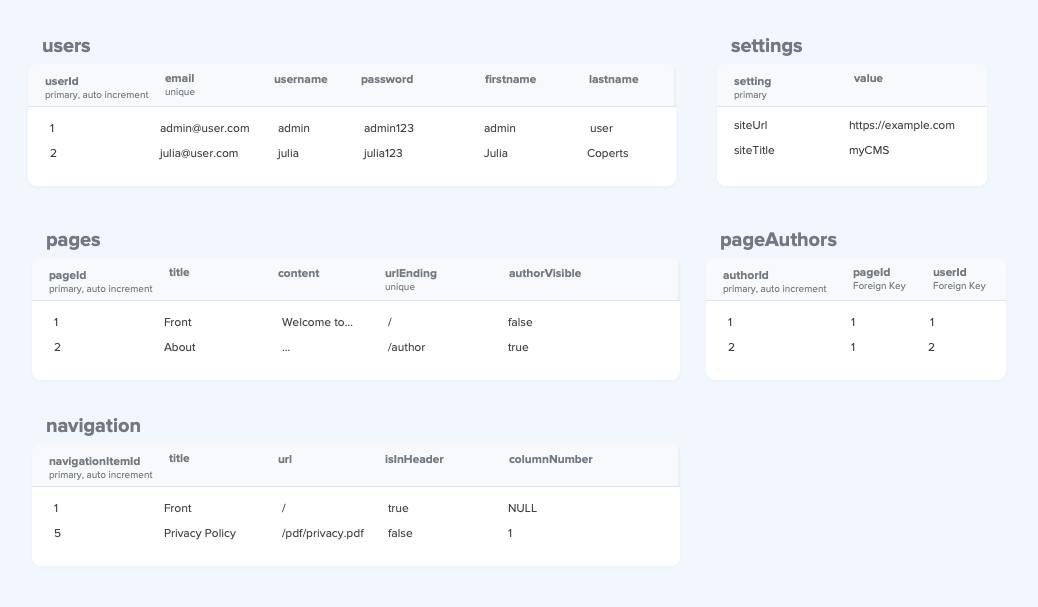
| userId (primary, auto increment) | email (unique) | username | password | firstname | lastname |
|---|---|---|---|---|---|
| 1 | admin@user.com | admin | admin123 | admin | user |
| 2 | julia@user.com | julia | julia123 | Julia | Coperts |
Table settings

This table is pretty straightforward and we could store all basic site settings in it. For now, we only need to store the site url address and site title.
So, minimal settings table with data from the reference image could look like this:
| setting (primary) | value |
|---|---|
| siteUrl | https://example.com |
| siteTitle | MyCMS |
Table pages

For each page, we want to store some information like it's title, content, author(s), url ending and if author information should be visible in the page.
That author information could be linked directly to users of the page. But hey, now that a page could potentially have multiple users who are authors of that page, we can't directly store that information in this table as that would violate 1st normal form (only single value allowed in a field). So to store the author information for pages, we need to move it to it's own table (we could call it pageAuthors).
But, the minimal settings for pages table with data from the reference image could look like this:
| pageId (primary, auto increment) | title | content | urlEnding (unique) | authorVisible |
|---|---|---|---|---|
| 1 | Front | Welcome to the frontpage of my cool website! | / | false |
| 2 | About | ... | /about | true |
| 3 | CV | ... | /cv | true |
| 4 | Portfolio | ... | /portfolio | true |
| 5 | Contact Me | ... | /contact | false |
Table pageAuthors

As mentioned above, we needed to move page authors into it's own table as otherwise we would store multiple authors in one field in the pages table.
So, this table would pretty much only contain foreign key relationship to the pages table's pageId and then foreign key relation to users table's userId. And we just store some author Id for each field.
Minimal settings for pageAuthors table with one example data could look like this:
| authorId (primary, auto increment) | pageId (foreign key, unique composite) | userId (foreign key, unique composite) |
|---|---|---|
| 1 | 1 | 1 |
| 2 | 1 | 2 |
| 3 | 2 | 2 |
Notice how the pageId and userId forms a composite unique key. This means that there never can be duplicate combination of the same pageId and userId.
Table navigation

This is our last table. For this table, we need to store information if the page should be visible in the header or footer, title of the item and page where the navigation link points to. In the footer we also have columns where footer items are placed at. We could directly link pages to navigation items, but for more flexibility user could manually determine the url where the link points to.
So, minimal settings for the navigation table with data taken from the reference image could look like this:
| navigationItemId (primary, auto increment) | title | url | isInHeader | columnNumber |
|---|---|---|---|---|
| 1 | Front | / | true | NULL |
| 2 | About | /about | true | NULL |
| 3 | CV | /cv | true | NULL |
| 4 | Portfolio | /portfolio | true | NULL |
| 5 | Privacy Policy | /pdf/privacy.pdf | false | 1 |
| 6 | Terms of Service | /pdf/tos.pdf | false | 1 |
| 7 | Contact Me | /contact | false | 2 |
Conclusion

So, the final database design with couple example records on each table would look like this: