
Now you know the basics of relational database design. And you know that data is usually split into multiple tables. Large database could even have hundreds of different tables!
So – how can we find data from the database easily without doing SELECT statements individually into each table? How can we more easily resolve relationships?
In this chapter we will have a look at joins to join data from multiple tables.
Getting Started

Before starting this exercise, let's import the gamestore database sql file so that we can work with that data. Example database is located in a github repository, so we need to first download the file and then import it.
Before importing the database, we need to first create an empty database. Use this command to create a database named gamestorejoins:
Then, run this command from your unix terminal, not from the mysql / mycli CLI (you can use the command exit; to exit from the mysql / mycli CLI):
curl -o gamestore.sql https://raw.githubusercontent.com/samk-ai/relational-databases-public/main/databases/gamestore.sql
mysql -p gamestorejoins < gamestore.sql
Then finally, connect to mysql / mycli CLI and use the imported database:
Great! Now let's first use the command SHOW TABLES to see all the tables. We can see that there are the customers, games and orders tables.
Then, let's execute the SELECT * commands for the tables to see what kind of data we have:
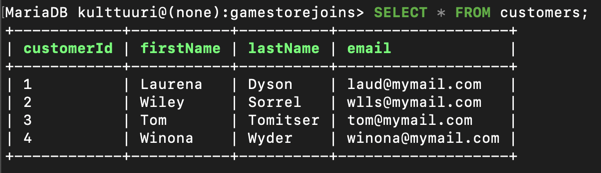
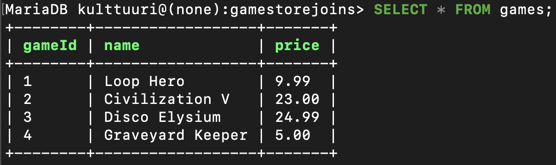
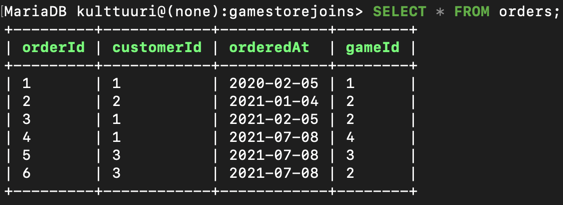
OK – we can see that there are 4 customers, 4 games and 6 orders made. So the question is, how can we easily see for example what orders have the user Laurena Dyson made?
Introducing Joins

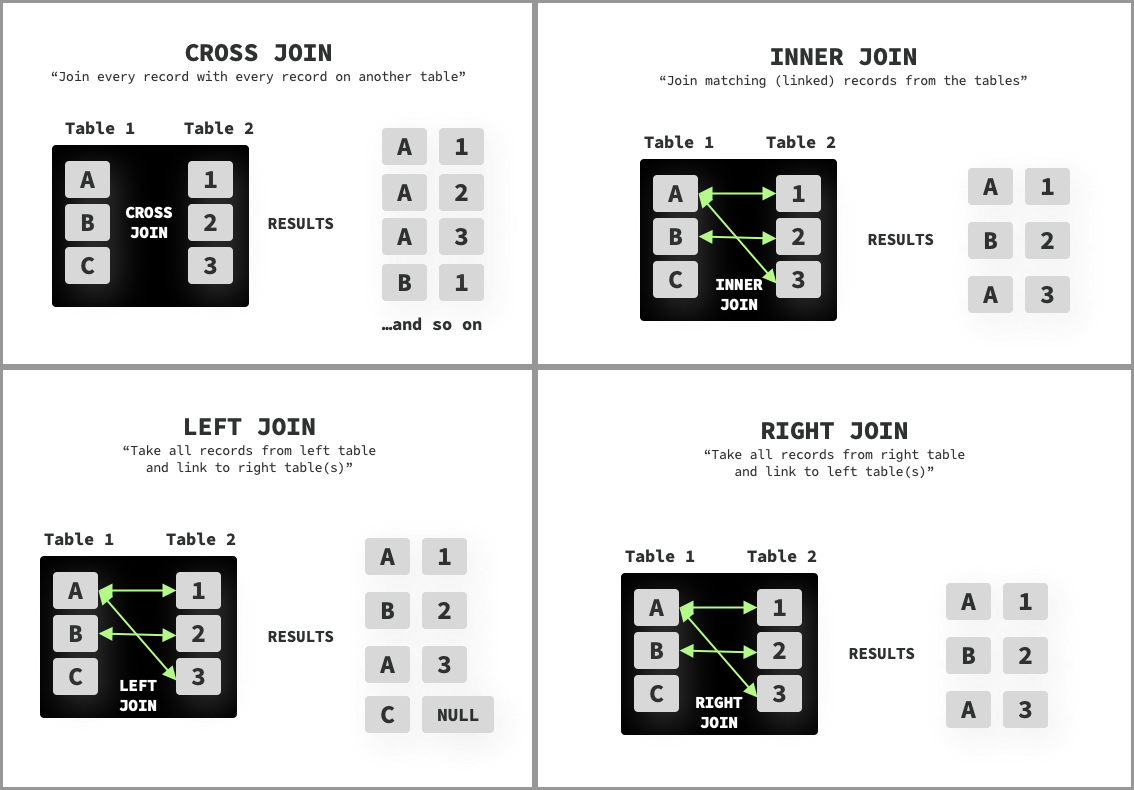
To combine data from multiple tables (two or more tables), we can use different kinds of JOINs. There are 4 types of joins available in MySQL: CROSS JOIN, INNER JOIN, LEFT JOIN and RIGHT JOIN.
Differences of these joins are as follows:
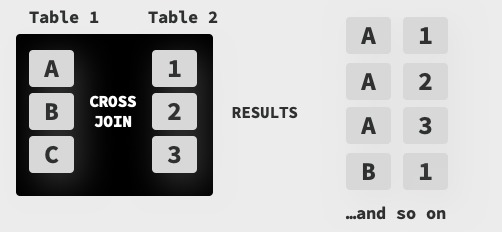
- CROSS JOIN: Combines records from all tables. Very rarely used.
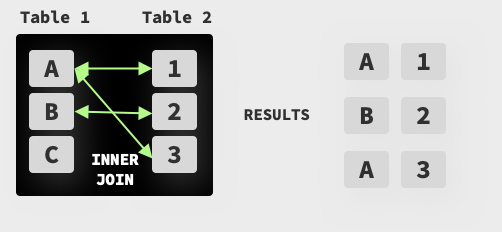
- INNER JOIN or just JOIN: Returns records that have matching values in both tables. Probably the most used JOIN.
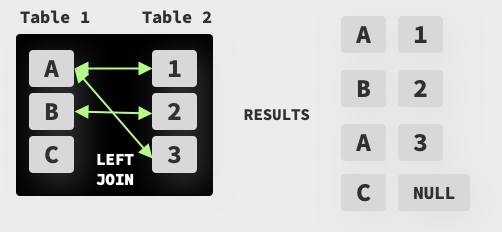
- LEFT JOIN: Returns everything from the left table and only matched records from the right table. Empty fields from the right table(s) are marked as null. In some DBMS systems this is also called as LEFT OUTER JOIN.
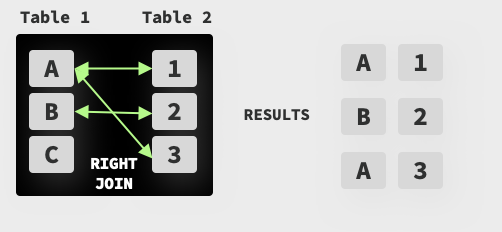
- RIGHT JOIN: Returns everything from the right table and only matched records from the left table. Empty fields from the left table(s) are marked as null. In some DBMS systems this is also called as RIGHT OUTER JOIN.
Let's start by exploring first the cross join.
Cross Join
Cross join combines records from all tables into one result.
There are 2 ways to do cross joins, first one is called implicit cross join and second one is called explicit cross join. They cause exactly the same behavior.
To get all customers and orders, we can do this (implicit cross join):
OR explicitly like this:
Which results in this kind of output (I have cut after the 5 first items):

This method is not very helpful in our case, as it makes duplicate records by combining the records from both tables. You can see that for example Laurena Dyson has 6 records shown here although she has only made 3 orders.
We can also add more tables into cross join. In the example below I have also added the table games to be cross joined:
Which would result in a crazy output, where everything from those 3 tables would be combined into one result set.
Reference Image
Below you can also see a reference image of how the CROSS JOIN works:
When Should I Cross Join?
Cross joins are very rarely used method of joining tables. One good example of doing cross joins is that you have one table where you can pull sizes of products and from another table colors of products. Then you can represent all the available sizes and colors.
Inner Join (or just Join)

Inner join can be used to get all records from two or more tables that match the specified criteria. Like with cross join, there exists the implicit and explicit versions of the inner join.
Example of how the implicit inner join works is like this:
OR we could use it alternatively like this using an explicit inner join:
This outputs:

And we can now see that using this inner join, we joined the two tables (customers and orders) into one and got each order made by each customer. This is great!
Now, to see also the game information for each order, we can also inner join the games table for that information:
SELECT * FROM customers, orders, games
  WHERE customers.customerId = orders.customerId
  AND orders.gameId = games.gameId;
OR explicitly:
SELECT * FROM customers
    INNER JOIN orders
        ON customers.customerId = orders.customerId
    INNER JOIN games
        ON orders.gameId = games.gameId;
Which gives us this information:

Great! Do also notice that customer with ID 4 (Winona Wyder) has not made any orders, so she has been excluded from this list because inner join only selects records from tables that match the specified criteria (in this case, customers.customerId = orders.customerId and customer with ID 4 was never found in the orders table)
Reference Image
Below you can also see a reference image of how the INNER JOIN (or just JOIN) works:
Left Join

Left join returns ALL the records from the left (first) table and then matching records (if any) from right (second and rest) table(s). Non-matching records on the right table(s) are marked as being null.
To try this out, let's left join all customers with their orders:
Which outputs:
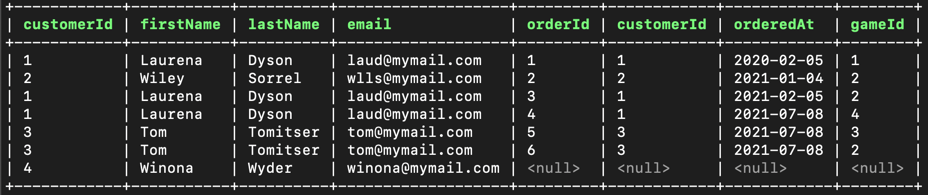
From the output we can see that it is quite similar to what we got with inner join, but with one exception: Left join shows ALL results from the left table (in this case the table customers) and orders for the customer. So as Winona Wyder had not made any orders yet, we can see the null order in her record.
We can also add more tables for being the right table, like this:
SELECT * FROM customers
  LEFT JOIN orders
    ON customers.customerId = orders.customerId
LEFT JOIN games
ON orders.gameId = games.gameId
Which outputs:

Reference Image
Below you can also see a reference image of how the LEFT JOIN (or LEFT OUTER JOIN) works:
Right Join

Right join is the opposite of left join as it returns ALL the records from the right (second and rest) table(s) and then matching records (if any) from the left (first) table.
For example, to get all orders and their customers:
Which outputs:

Reference Image
Below you can also see a reference image of how the RIGHT JOIN (or RIGHT OUTER JOIN) works:
Naming Tables
As it is possible to rename (alias) fields, it is also possible to rename tables. You can do it like this:
SELECT * FROM customers AS c
  LEFT JOIN orders AS o
    ON c.customerId = o.customerId
  LEFT JOIN games AS g
    ON o.gameId = g.gameId
Using Where, Limiting and Renaming Fields in Joins

In the examples above, we selected all the fields in the tables with all the data. But joins can also be combined with specific output fields and WHERE statements.
Using Where
For example, to only get orders (and game information) for a customer that has a name Laurena, we could do this:
SELECT * FROM customers, orders, games
  WHERE customers.customerId = orders.customerId
  AND orders.gameId = games.gameId
  AND customers.firstName = "Laurena";
Which outputs this:

Great! And that we could combine by adding lastName = 'Dyson' to specifically get that user, or we could use email addresses or anything else for this.
We could even find all Civilization V games purchased by users with this kind of statement:
SELECT * FROM customers, orders, games
  WHERE customers.customerId = orders.customerId
  AND orders.gameId = games.gameId
  AND games.name = "Civilization V"
Which outputs this:

Nice!
Limiting Fields
Currently we are also getting all the fields back from all the tables. We can limit the amount of data we get back by replacing the asterisk in our SQL query with fields from the tables.
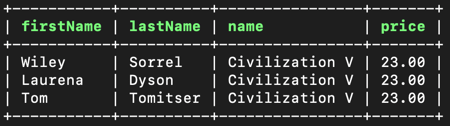
With this query, we will only get firstname, lastname, game name and game price for each record:
SELECT customers.firstName, customers.lastName, games.name, games.price FROM customers, orders, games
  WHERE customers.customerId = orders.customerId
  AND orders.gameId = games.gameId
  AND games.name = "Civilization V"
Which outputs:
Neat!
Renaming Fields
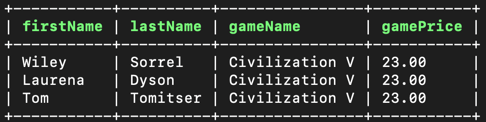
In the example above we can see that the fields name and price can be misleading. In this case, we can also rename the fields that we get back using an AS (alias) in our query:
SELECT customers.firstName, customers.lastName, games.name as gameName, games.price AS gamePrice FROM customers, orders, games
  WHERE customers.customerId = orders.customerId
  AND orders.gameId = games.gameId
  AND games.name = "Civilization V"
Which outputs:
Full Reference Image of Joins
Conclusion

- Joins can be used to join data from multiple tables
- There are 4 different joins available: Cross Join, Inner Join, Left Join and Right Join
- Where statement can be used to further specify the data you want to search for
- You can limit what fields you want back from the results by replacing the asterisk with actual column names
- Output field names can be renamed with AS. This is called a field alias. You can also rename tables the same way.
Learn More
