Union & Distinct

Getting Started

For these exercises, we will be continuing with the gameStore database. You can just use the existing database if you still have it, or download and import it using these commands:
Then, download and import the gameStore database (from unix terminal):
curl -o gamestore.sql https://raw.githubusercontent.com/samk-ai/relational-databases-public/main/databases/gamestore.sql
mysql -p gamestorejoins < gamestore.sql
Then, just open mysql CLI and use the database;
Distinct

By default, when you query your database and you will have duplicate data in your database or you would get duplicate data back as an output, you'll have the option to use the SELECT DISTINCT statement to only get some data back uniquely.
For example, to find names of all games ordered by customers (uniquely, only the same game once in the output), we could do:
which outputs:
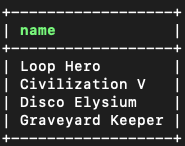
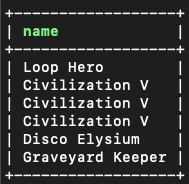
Notice the difference when we would do just this:
which would output this:
Union

Union can be used to combine columns from multiple tables. UNION by default removes duplicates, but to allow duplicate values you can also use UNION ALL.
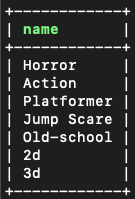
For example, to get the names of all genres and subGenres, we could do:
Which outputs:
Union All
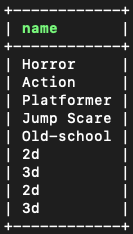
To get duplicate values, we could use the UNION ALL:
Which outputs:
Conclusion

- Distinct can be used to filter out duplicate data or output results
- Union can be used to combine data from multiple tables
Learn More
