Group By

The last thing we will learn is a SQL statement called GROUP BY. This GROUP BY groups (summarizes / aggregates) rows that have the same value into one.
Getting Started

For these exercises, we will be continuing with the gameStore database. You can just use the existing database if you still have it, or download and import it using these commands:
Then, download and import the gameStore database (from unix terminal):
curl -o gamestore.sql https://raw.githubusercontent.com/samk-ai/relational-databases-public/main/databases/gamestore.sql
mysql -p gamestorejoins < gamestore.sql
Then, just open mysql CLI and use the database:
Group By

GROUP BY groups (summarizes / aggregates) rows that have the same value into one. Usually you combine the GROUP BY with the count(), sum() and such functions.
Let's start by getting all orders from our orders table:
Which outputs:
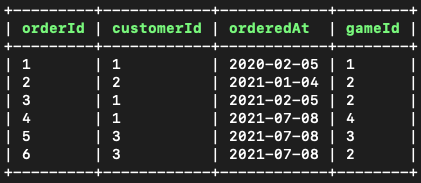
Great! Now let's try grouping the orders by each customer with the customerId by adding the GROUP BY statement:
Which outputs:
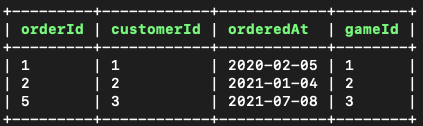
OK – Weird! This seems to only have removed duplicate values from our orders table and we can only see one customer in each row. But what is actually happening here is that the datatabase engine grouped your result into groups but you cannot see the groups in the result.
So, what your database engine did in the background, it grouped your results like this (but you cannot see this):
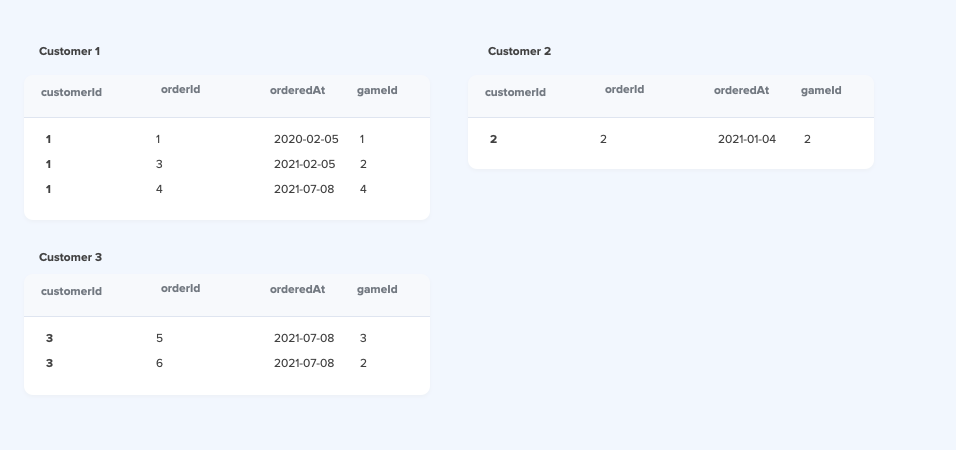
Note that this is similar to what you would get if you would individually do it like this for each item:
SELECT * FROM orders WHERE customerId = 1;
SELECT * FROM orders WHERE customerId = 2;
SELECT * FROM orders WHERE customerId = 3;
Using Count()
So as mentioned above, GROUP BY pretty much requires some other function to work well. In our case, if we would like to count all the orders made by each customer individually, we would do this:
Which outputs:
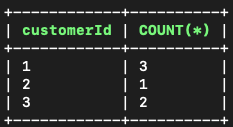
This COUNT(*) will count all the records for each customer and add it into the output named as COUNT(*)
Conclusion

- GROUP BY groups (summarizes / aggregates) rows that have the same value into one. it can be little bit tricky to learn on how to use this, but as you use it few different times you should start getting hang of it.
Learn More
